The generation tray
Generations don't land on the canvas by themselves. They collect in a tray at the bottom of the Canvas, up to five running at once, and you place the ones you want.
Last updated Aug 29, 2026
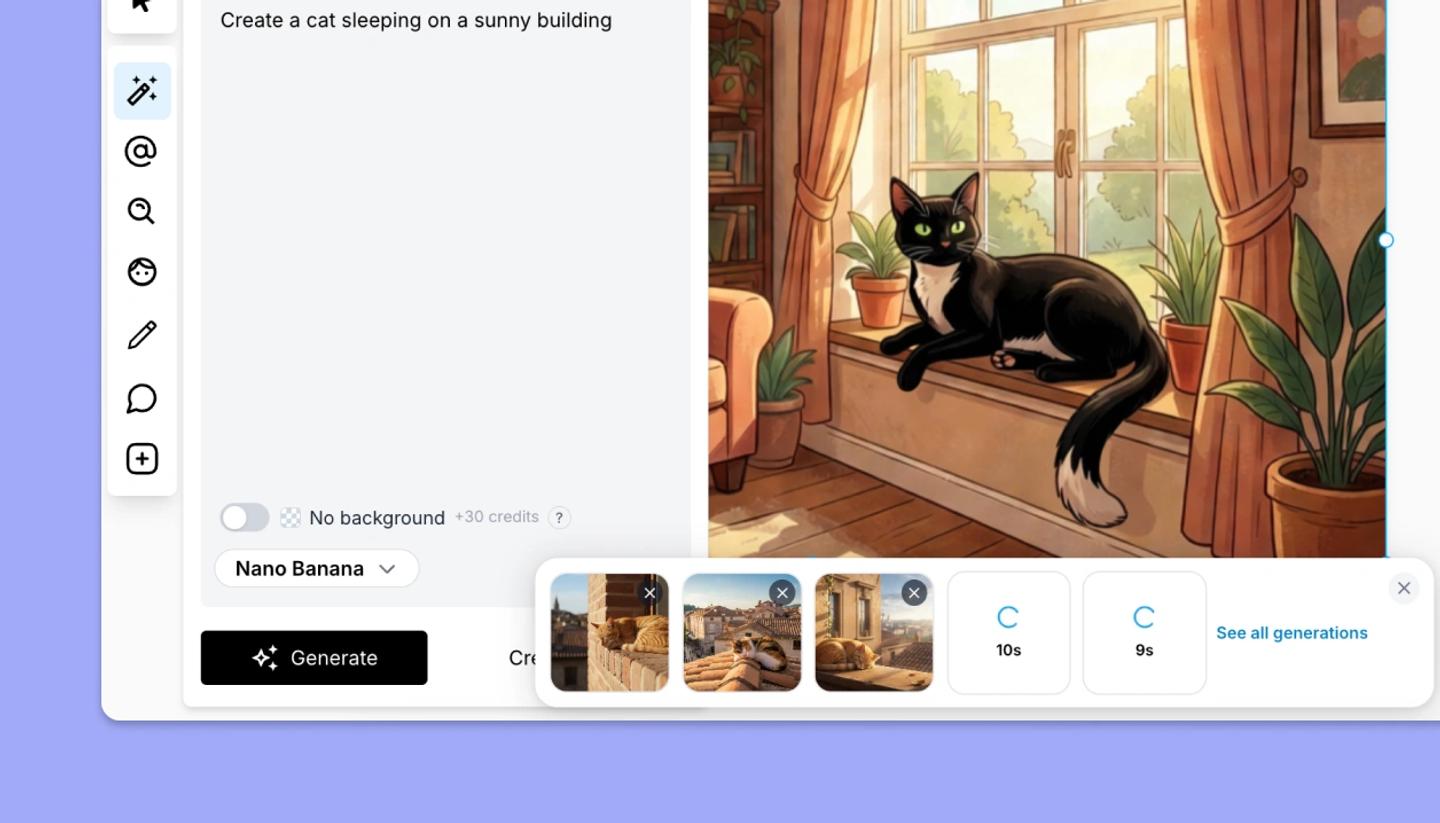
Click Generate and a tile appears in the tray, showing its progress. When it's done, hover over the tile and you'll see Click to place. If a generation fails, its tile shows Failed and doesn't retry by itself. Click the X on any tile to dismiss it. When the tray is collapsed, it shows a count such as 2 generating and 3 ready. When it's expanded, See all generations at the end opens your AI history.
Why it works this way
You can fire off several variations, keep working, and choose the best without cleaning up the rest. Up to five run in parallel; a sixth generation click will display a warning message: Up to 5 generations at a time. Wait for one to finish. Nothing is placed until you click, so the canvas never fills with images you didn't ask for.
What placing does
An image with a background is scaled to cover the frame and sent behind everything, as a backdrop. A No background image is placed as a normal object at its own size, ready to move and resize. You can place the same tile more than once, and everything you generate is also kept in your AI history, so dismissing a tile loses nothing.
Need more help?
Send us a message. We reply within 3 days, usually sooner.