Send a canvas item to Tribe AI
Select anything on the canvas and choose Send to Tribe AI from its bar. It becomes a reference image in the panel, so you can restyle a library character, redraw a sketch, or generate a scene around a prop.
Last updated Sep 11, 2026
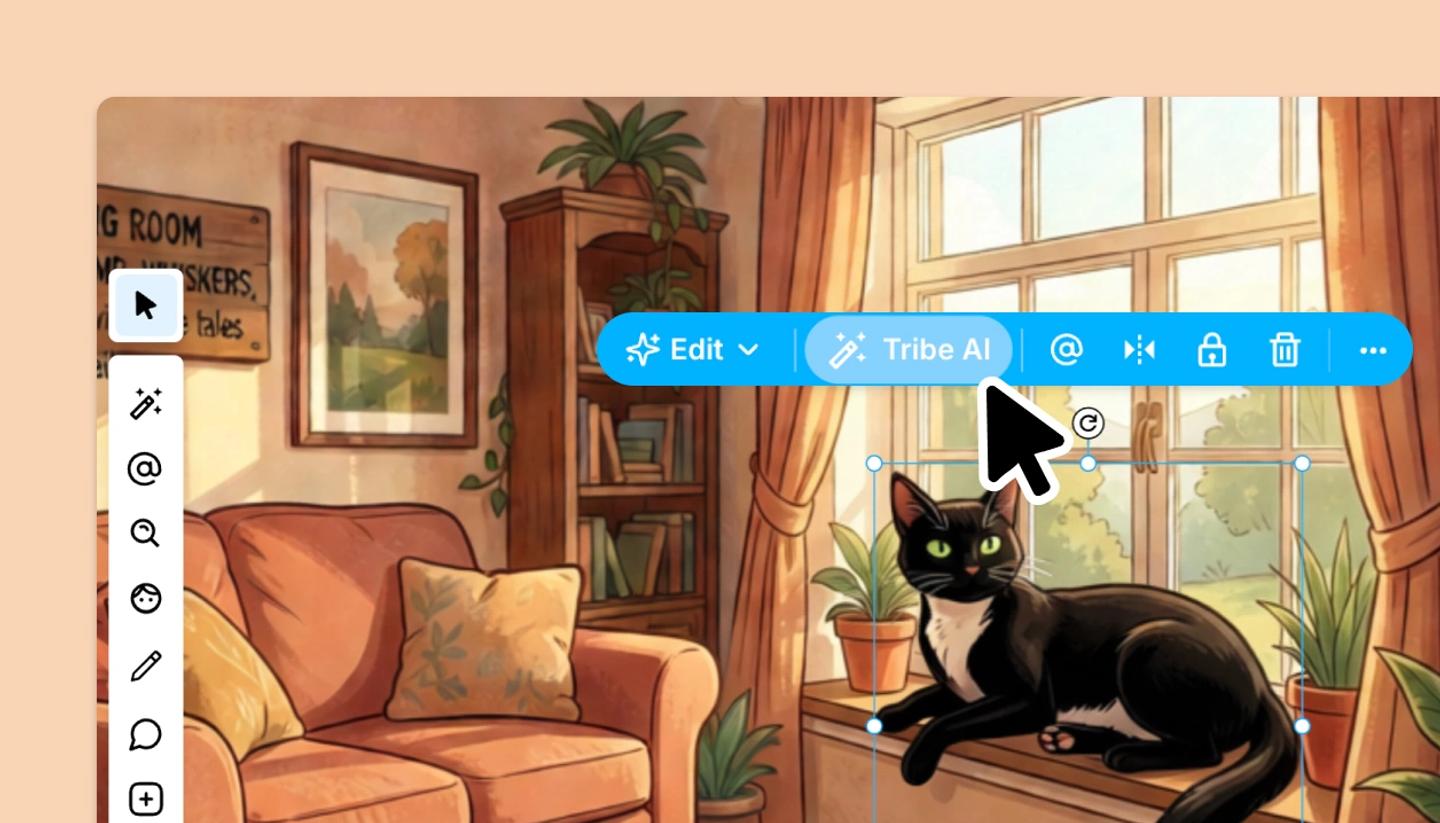
- Select the object: a character, a drawing, a prop, a photo, or several at once. In the blue bar above it click
Send to Tribe AI(on a character, the footer of the character editor hasEdit with AI, which does the same). - The Tribe AI panel opens with the item attached as a reference. Describe what you want done with it:
@Image 1 as a watercolour painting,the character in @Image 1 running through rain, low angle. - Choose a style and model, keep
No backgroundon if you want a cut-out, and clickGenerate. Place the result from the tray; the original stays on the canvas until you delete it.
When to use this rather than Magic Edit
Send to Tribe AI makes a new image inspired by the item; the pose, style and setting can all change. Magic Edit changes the image in place: removing a background, expanding the frame, retouching a detail, relighting. To turn a rough sketch into a finished frame, use Tribe AI. To fix one thing in an image, use Magic Edit.
Was this article helpful?
Need more help?
Send us a message. We reply within 3 days, usually sooner.